Icon of program: RunItAs

RunItAs for Windows

  • Free
  • 3.5
    4
  • 3.1K
  • V1.0
Free Download for Windows

View an ad to download for free

Run applications from a limited or guest account

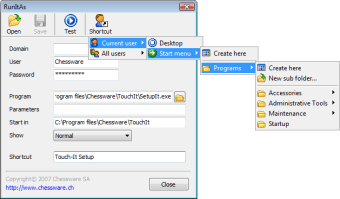
Have you ever needed to run a program from a limited guest account on a PC where you don't usually have such privileges? Without the admin password, usually you can't but RunItAs provides a simple solution by running an executable file using specified credentials. RunitAs runs an executable file using the specified creditentials that you used to login i.e. (Domain, Username and Password) from a limited or guest account. It's very similar to the Windows "RunAs" function but with more features.

Top Recommended Alternative

Once you've set all the required fields, it's very easy to create shortcuts for the current user or all the users of the computer to execut a program. The shortcut uses the EXE icon of the selected program and it's default name is cleverly retreived from the program resources description. Whenever a new shortcut is required, just open the project again and you can create it within seconds.

If you've been blocked from a machine and want to execute a file or simply want to create an EXE shortcut for a new program, this is a very simple but effective program.


  • Pros

    • Allows you to create EXE files with limited permissions
    • Easily create EXE shortcuts for new programs
    • Simple to use
  • Cons

    • Doesn't always find the right program description
 0/1

App specs

  • Developer

  • License

    Free

  • Version

    1.0

  • Latest update

  • Platform

    Windows

  • OS

    Windows XP

  • Language

    English

  • Downloads

    3.1K

  • Size

    533.03 KB

Program available in other languages


Icon of program: RunItAs

RunItAs for PC

  • Free
  • 3.5
    4
  • 3.1K
  • V1.0
Free Download for PC

View an ad to download for free


User reviews about RunItAs

Have you tried RunItAs? Be the first to leave your opinion!

Add review

You may also like

Alternatives to RunItAs

Explore Apps

Latest articles

Laws concerning the use of this software vary from country to country. We do not encourage or condone the use of this program if it is in violation of these laws.
Softonic

Is RunItAs safe?

Score result: Clean

This file passed a comprehensive security scan using VirusTotal technology. It is safe to download.

  • Virus free
  • Spyware free
  • Malware free
  • Verified by Security Partners

    VirusTotal logo

Scan Info

Last scan
Wednesday, December 2, 2020
Scan provider
VirusTotal

Softonic security commitment

RunItAs has been thoroughly scanned by our advanced security systems and verified by industry-leading partners. This file comes from the official developer and has passed all our security checks, showing no signs of viruses, malware, or spyware. For more information, visit our Security and Trust Center

Signed in to Softonic as